Key Takeaways
- Before arriving in Bali, set up your Grab account, payment method, location access, and eSIM while connected to stable Wi-Fi.
- To use Grab with an eSIM, install and activate the eSIM, select it as your mobile data line, then open Grab and use the app normally. The Grab app automatically uses your phone’s selected data connection.
- You can keep your home number active for OTP verification while using the eSIM for internet access.
- A regular SIM card or Wi-Fi can also work, so using an eSIM is convenient but not mandatory.
Many foreign visitors in Bali use online transportation apps like Grab to get around. With Grab, you can order motorcycle taxis, regular taxis, have parcels or food delivered, and even shop online. Now, you can link your eSIM to the Grab app, making travel in Bali even more convenient.
eSIM is a digital version of a SIM card. It lets you set up a mobile plan without a physical card, and most phones can support more than 2 eSIMs. For example, iPhones can hold up to eight eSIMs on a single device.
So, how do you connect your eSIM to the Grab app to stay connected in Bali? Here's the answer.
How to Use an eSIM With the Grab App
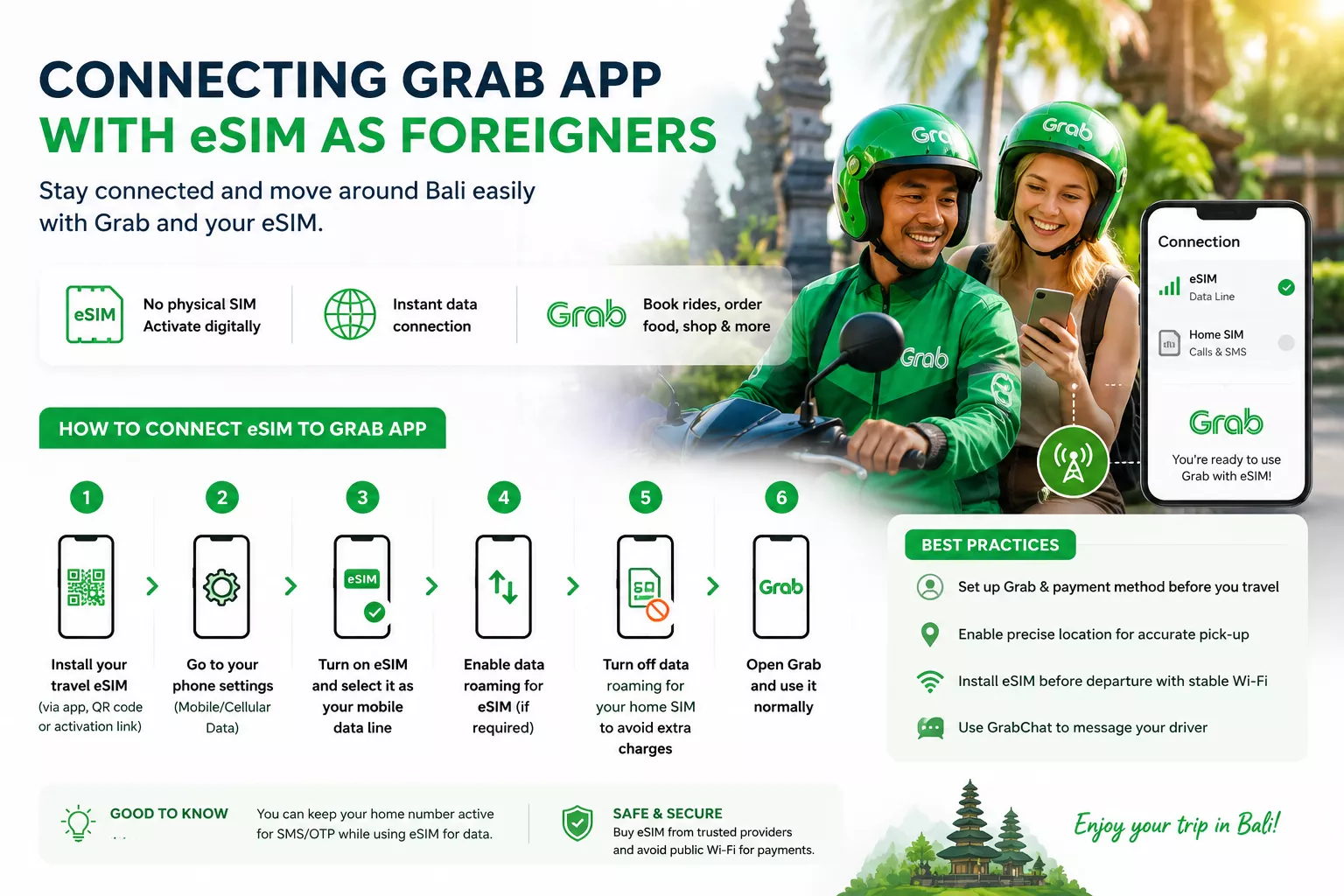
You can buy a travel eSIM before your trip or once you arrive in Bali. Some Indonesian eSIMs come with a local +62 number, while many affordable international eSIMs offer data only. Either option will give you internet access.
After you install the eSIM, it provides the internet connection for Grab. You don’t need to adjust any settings in the Grab app itself.
Here’s how to set it up:
- Open your phone’s mobile or cellular settings.
- Turn on the new travel eSIM.
- Select it as the preferred line for mobile data.
- Turn on data roaming for the travel eSIM when required by the provider.
- Turn off data roaming for your home SIM to prevent unexpected charges.
- Open Grab and use it normally.
If your phone supports dual SIMs, you can keep both lines active but choose only one for mobile data. This way, you use the travel eSIM for internet in Indonesia and keep your usual number for SMS.
Also, don’t remove or deactivate the number linked to your Grab account. You might need it if Grab asks you to log in or verify your account.
Read More: Best Bali SIM Card: Complete Guide for Travelers
Do You Need an Indonesian Number for the Grab App?
Not always. According to Grab’s Help Center, you can use an international phone number to get an OTP and set up an account. So, most tourists can register with their home-country number.
However, keep in mind that your home carrier might charge for roaming. Receiving SMS is often free, but it depends on your carrier and plan.

Is It Mandatory to Have an eSIM when Vacationing in Bali?
Not necessarily. You can choose how you want to get online, whether that’s with an eSIM, a regular SIM card, or WiFi. This way, you’ll be able to communicate and book rides easily.
For eSIMs, setup depends on your provider. You might install it using an app, an activation link, or a QR code. After activation, your phone connects to a local network, and you get internet access.
Read More: Going Solo in Bali for the First Time? Here's What's Actually Safe (and What's Not)
Best Practices Before Using Grab in Bali

1. Set Up Grab Before Traveling
Download Grab and set up your account while you still have good Wi-Fi and your usual phone number. This helps you get the OTP and fix any login issues before you arrive.
2. Add a Payment Method Early
Grab Indonesia lets you pay in-app with OVO or select debit and credit cards. What’s available depends on your account, card, and location. For some rides, you can also pay with cash.
Add and check your payment method before your first ride. It’s also a good idea to have some Indonesian rupiah on hand in case your foreign card doesn’t work.
Read More: Can I Pay With My Card in Indonesia? Payment Guide for Foreigners
3. Enable Precise Location
Grab uses your phone’s GPS to find your pickup spot. Make sure the app can access your exact location when you book a ride.
Always double-check the pickup pin before you confirm. Big places like airports, malls, hotels, and beach clubs often have more than one entrance.
4. Download Your eSIM before Departure
Install your eSIM while you still have a good Wi-Fi connection. Some eSIMs need to be installed before you travel but activated only after you arrive in Indonesia, so be sure to follow your provider’s instructions.
Common Problems with Using Grab in Bali and How to Fix Them
Some of our foreign team members use Grab for daily transportation and ordering food. However, sometimes they run into a few problems. Here are those common issues and simple ways to fix them:
Grab Works on Wi-Fi but Not on Mobile Data
Check that:
- Your travel eSIM is turned on.
- It is selected as the mobile data line.
- Data roaming is enabled for that eSIM when required.
- Your data package has started and has a remaining allowance.
- Grab is allowed to use mobile data.
If your eSIM just connected to an Indonesian network, try restarting your phone.
You are Not Receiving the Grab OTP
Check that the eSIM linked to your Grab account is active and can receive international SMS messages. Also, make sure you entered the right country code and phone number. Don’t request the OTP too many times in a row, as this can delay receiving new codes.
Your Grab Driver Cannot Find You
Move the pickup pin to the right entrance and use GrabChat to tell your driver a clear landmark. At Indonesian airports, follow the signs to the official ride-hailing pickup area instead of calling a car to the arrivals door.
Your Card is Rejected
If your card is declined, try another card or choose cash if you can. Some banks block foreign or app payments until you approve them.
Conclusion
If you want to stay connected while traveling in Bali, using an eSIM with Grab is a simple option. After you install the eSIM and set it for mobile data, you can use Grab as usual for rides, food delivery, shopping, and sending parcels.
Getting around Bali is easier with reliable transportation, but having the right place to stay is just as important. If you plan to stay longer, Bali Villa Realty has a range of villas for monthly rent or yearly rent in Bali’s best areas.
We’ll also help you find one that suits your style, preferred location, and budget—completely free, with no obligation. Contact us anytime, and let’s make your Bali experience truly unforgettable.
FAQ
Yes. eSIM will give you an internet connection for using all app in your phone, including Grab. You can also purchase mobile data directly through the Grab app for a smooth and secure connection
Yes, Grab and Gojek can work without a local SIM card. You only need a valid phone number that can receive an SMS verification code, plus a stable internet connection from Wi-Fi or a travel eSIM such as Nomad.
For the lowest cost per gigabyte in Indonesia, MobiMatter and Jetpac usually offer strong value. For smaller data packages, Airalo and eSimpli can also be affordable options.